UX/UI Processes with AI: From Research to Handoff in 3 Weeks
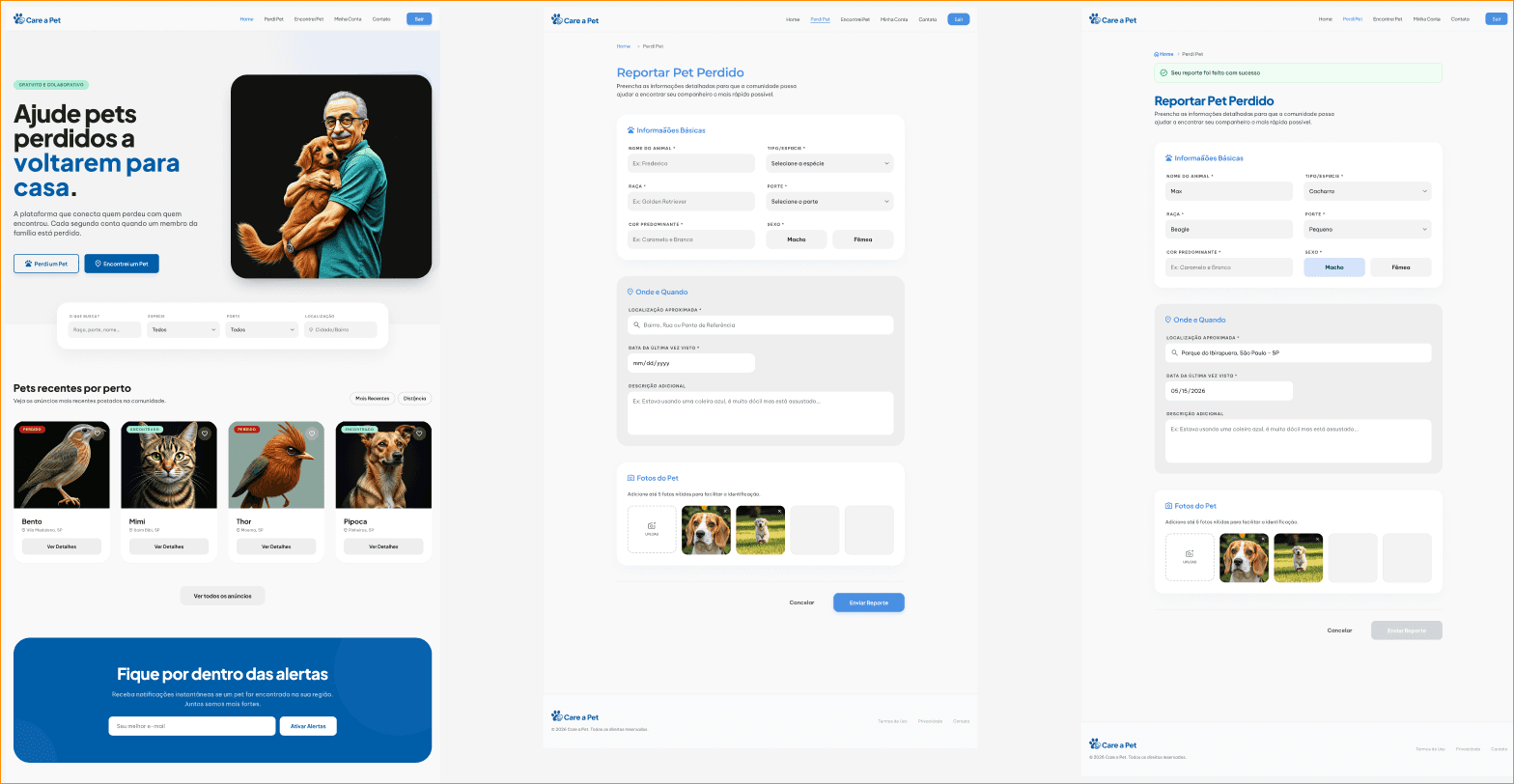
A high-velocity desktop application designed to streamline pet rescue operations by connecting owners and finders. The project served as an internal Globant experiment to integrate generative AI from initial research to final engineering handoff.
Client
Globant - Care A Pet
Service
UI/UX Design / Front-end Developing
Year
2026

From Research to Handoff in 3 Weeks
An agile, AI-driven desktop application designed to solve the logistical and emotional challenges of rescuing lost pets. By bridging the gap between distressed owners and local finders, the platform centralizes community search efforts. This project served as a high-velocity methodological experiment inside Globant, testing the boundaries of integrating generative AI across every stage of the product lifecycle to compress months of design and alignment into a single 3-week sprint.
The Business Challenge & Scope
Animal abandonment and lost pets represent a significant social and logistical issue. Based on a brief initial scope, our team refined the requirements and established 3 core user personas to guide the product experience:
The Owner (Mariana, 23): Lost her cat. She needs to report the disappearance quickly, generate local alerts, and requires strict privacy controls when receiving leads to protect her sensitive data.
The Finder/Helper (Carlos, 24): Found a pet on the street and wants to locate the owner. He needs an extremely simple, frictionless workflow to post a photo and location without bureaucratic barriers.
The Engaged Community Member (Lúcia, 58): Has not lost or found a pet but is highly active in her neighborhood. She uses the desktop application to monitor regional alerts and manually shares information with neighbors who lack access to the platform.

Design Governance & AI Rituals
To ensure the design team—composed of myself and two Experience Designers—maintained synergy and avoided working in silos, I led the organization of AI-focused agile rituals.
Through Synergy Rituals, I facilitated strategic syncs to validate project progression and unearth common hurdles. Parallel to this, we established Collaborative Prompt Engineering sessions. These were dedicated spaces to open, test, and calibrate the specific prompts each designer was using individually. This alignment ensured that despite independent execution, our AI outputs maintained a consistent product voice, tone, and logic across the entire workflow.
Week 1: Immersion, Research & Information Architecture
The initial days focused entirely on data collection and close alignment with senior stakeholders, including Business Analysts (BAs) and Project Managers (PMs).
We initiated an AI-Scaled Benchmarking phase, leveraging generative tools to conduct rapid market analysis. This drastically accelerated the early research stage and delivered consolidated data on user behavior and existing competitor solutions. Immediately after, we transitioned to Agile Information Architecture.
By utilizing AI plugins directly integrated into Figma, we instantly generated and refined the primary User Flows and Sitemaps. This unprecedented speed provided massive Business Value, allowing Business Analysts to review and iterate on core business rules and edge-case scenarios within the first few days, long before high-fidelity visual UI development even began.


The Technical Challenge: Pivoting Prototyping Tools
Working with emerging AI tools demands high adaptability and rapid decision-making. During the UI process, our team went through an intense 2-day experimentation phase to determine the best platform for front-end engineering integration, encountering significant hurdles along the way.
We started with Iteration 1 (CODA for AI), Globant's internal tool, to generate our first wireframes. However, the algorithm struggled to iterate on fine adjustments after the initial prompt, delivering a weak user experience that fell short of our product goals. This required the team to step in manually and rebuild the layout structure.
Looking for higher fidelity, we shifted to Iteration 2 (Google Stitch) to explore advanced layouts and perform A/B testing on content hierarchy. While it generated compelling individual variants, we noticed a severe breach of a fundamental UI principle: consistency. Stitch produced screens with mismatched typography and conflicting imagery styles—mixing realistic photos with cartoon illustrations across different flows—which broke the application's visual unity.
To bypass these limitations under an aggressive deadline, we found The Ideal Solution (Figma Make).
We consolidated our structured canvas concepts inside Figma and let Figma Make translate our established layout logic. The tool was precise, generating actual high-fidelity, interactive prototypes with functional navigation and providing the seamless connection required to simulate the final product.


Engineering Handoff & Key Takeaways
The final phase prioritized seamless integration with the Front-end engineering team to ensure code generation matched our accelerated design velocity.
Through an Integrated Handoff, screens were perfectly structured and mapped via Figma Make. We handed over clean user flows to the developers, allowing them to extract production-ready components and begin coding immediately. This phase also bridged the gap between design and code.
Navigating these tools required close contact with programming logic, as understanding how AI interpreted visual layouts into code allowed the design team to build cleaner, more development-friendly layouts from the ground up.

Impact & Conclusions
Orchestrating AI streamlined the conception of a complex ecosystem—which typically takes months—down to just 3 weeks, massively reducing time-to-market. Furthermore, it aligned the product vision early, allowing Business and Product teams to visualize a live, interactive application early in the cycle due to AI's speed in translating ideas into tangible logical flows.
Ultimately, this project proved that while AI is an unprecedented productivity multiplier for research and structural frameworks, the role of the Senior Designer remains irreplaceable. A UX/UI Designer's critical eye is the ultimate requirement to guarantee visual consistency, structural integrity, heuristic compliance, and true aesthetic refinement.
Applied Toolset
UI/UX & Finalization: Figma, Figma Make, and AI Plugins for User Flows and Sitemaps.
AI R&D & Prototyping: CODA for AI (Globant) and Google Stitch.
Methodology: Applied Prompt Engineering, Agile Design Sprints, and AI Governance Rituals.


See more of my work

UX/UI Processes with AI: From Research to Handoff in 3 Weeks
A high-velocity desktop application designed to streamline pet rescue operations by connecting owners and finders. The project served as an internal Globant experiment to integrate generative AI from initial research to final engineering handoff.
Client
Globant - Care A Pet
Service
UI/UX Design / Front-end Developing
Year
2026
From Research to Handoff in 3 Weeks
An agile, AI-driven desktop application designed to solve the logistical and emotional challenges of rescuing lost pets. By bridging the gap between distressed owners and local finders, the platform centralizes community search efforts. This project served as a high-velocity methodological experiment inside Globant, testing the boundaries of integrating generative AI across every stage of the product lifecycle to compress months of design and alignment into a single 3-week sprint.
The Business Challenge & Scope
Animal abandonment and lost pets represent a significant social and logistical issue. Based on a brief initial scope, our team refined the requirements and established 3 core user personas to guide the product experience:
The Owner (Mariana, 23): Lost her cat. She needs to report the disappearance quickly, generate local alerts, and requires strict privacy controls when receiving leads to protect her sensitive data.
The Finder/Helper (Carlos, 24): Found a pet on the street and wants to locate the owner. He needs an extremely simple, frictionless workflow to post a photo and location without bureaucratic barriers.
The Engaged Community Member (Lúcia, 58): Has not lost or found a pet but is highly active in her neighborhood. She uses the desktop application to monitor regional alerts and manually shares information with neighbors who lack access to the platform.
Design Governance & AI Rituals
To ensure the design team—composed of myself and two Experience Designers—maintained synergy and avoided working in silos, I led the organization of AI-focused agile rituals.
Through Synergy Rituals, I facilitated strategic syncs to validate project progression and unearth common hurdles. Parallel to this, we established Collaborative Prompt Engineering sessions. These were dedicated spaces to open, test, and calibrate the specific prompts each designer was using individually. This alignment ensured that despite independent execution, our AI outputs maintained a consistent product voice, tone, and logic across the entire workflow.
Week 1: Immersion, Research & Information Architecture
The initial days focused entirely on data collection and close alignment with senior stakeholders, including Business Analysts (BAs) and Project Managers (PMs).
We initiated an AI-Scaled Benchmarking phase, leveraging generative tools to conduct rapid market analysis. This drastically accelerated the early research stage and delivered consolidated data on user behavior and existing competitor solutions. Immediately after, we transitioned to Agile Information Architecture.
By utilizing AI plugins directly integrated into Figma, we instantly generated and refined the primary User Flows and Sitemaps. This unprecedented speed provided massive Business Value, allowing Business Analysts to review and iterate on core business rules and edge-case scenarios within the first few days, long before high-fidelity visual UI development even began.
The Technical Challenge: Pivoting Prototyping Tools
Working with emerging AI tools demands high adaptability and rapid decision-making. During the UI process, our team went through an intense 2-day experimentation phase to determine the best platform for front-end engineering integration, encountering significant hurdles along the way.
We started with Iteration 1 (CODA for AI), Globant's internal tool, to generate our first wireframes. However, the algorithm struggled to iterate on fine adjustments after the initial prompt, delivering a weak user experience that fell short of our product goals. This required the team to step in manually and rebuild the layout structure.
Looking for higher fidelity, we shifted to Iteration 2 (Google Stitch) to explore advanced layouts and perform A/B testing on content hierarchy. While it generated compelling individual variants, we noticed a severe breach of a fundamental UI principle: consistency. Stitch produced screens with mismatched typography and conflicting imagery styles—mixing realistic photos with cartoon illustrations across different flows—which broke the application's visual unity.
To bypass these limitations under an aggressive deadline, we found The Ideal Solution (Figma Make).
We consolidated our structured canvas concepts inside Figma and let Figma Make translate our established layout logic. The tool was precise, generating actual high-fidelity, interactive prototypes with functional navigation and providing the seamless connection required to simulate the final product.
Engineering Handoff & Key Takeaways
The final phase prioritized seamless integration with the Front-end engineering team to ensure code generation matched our accelerated design velocity.
Through an Integrated Handoff, screens were perfectly structured and mapped via Figma Make. We handed over clean user flows to the developers, allowing them to extract production-ready components and begin coding immediately. This phase also bridged the gap between design and code.
Navigating these tools required close contact with programming logic, as understanding how AI interpreted visual layouts into code allowed the design team to build cleaner, more development-friendly layouts from the ground up.
Impact & Conclusions
Orchestrating AI streamlined the conception of a complex ecosystem—which typically takes months—down to just 3 weeks, massively reducing time-to-market. Furthermore, it aligned the product vision early, allowing Business and Product teams to visualize a live, interactive application early in the cycle due to AI's speed in translating ideas into tangible logical flows.
Ultimately, this project proved that while AI is an unprecedented productivity multiplier for research and structural frameworks, the role of the Senior Designer remains irreplaceable. A UX/UI Designer's critical eye is the ultimate requirement to guarantee visual consistency, structural integrity, heuristic compliance, and true aesthetic refinement.
Applied Toolset
UI/UX & Finalization: Figma, Figma Make, and AI Plugins for User Flows and Sitemaps.
AI R&D & Prototyping: CODA for AI (Globant) and Google Stitch.
Methodology: Applied Prompt Engineering, Agile Design Sprints, and AI Governance Rituals.